Product configuration
Turn product choices into a manufacturable result.
Help your sales team and customers find the right combination of dimensions, materials and options. Tomstok brings those choices together in a physical product model and makes their consequences visible as the configuration takes shape.
Guide the user towards a valid next choice
Dimensions, materials and components are selected within the choices allowed by the product model. A property may be fixed, have an editable default or require an explicit answer. When a choice changes, dependent options are evaluated within the complete construction.
Product rules become useful during the sale. Users can understand what is still missing, which alternatives are relevant and why a particular combination cannot be used.
Understand choices that affect each other
The illustration shows the relationship between glazing bar type and glazing specification. An applied bar sits on the glass. A true dividing bar physically separates the glass and therefore changes the available glazing choices.
Product properties and values connect to the drawing. AI helps clarify your customer’s request and suggest relevant choices; product rules determine which combinations are possible. The user reviews and approves the changes.
A request becomes specific product choices
- 1. Clarify properties and values
The product model defines the available choices and identifies missing information.
- Dimensions: width and height
- Material and finish
- Glazing bars and glass
- 2. See what the choice changes Applied glazing bar
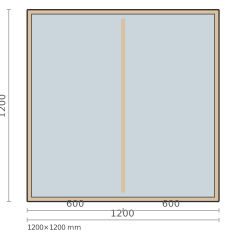
The bar is attached to the glass.
True divided glazing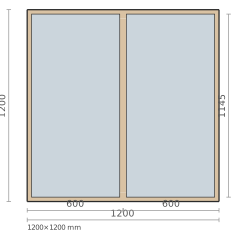
The bar physically divides the glass.
- 3. Get assistance — and keep control
AI helps translate your customer’s request into relevant choices and asks about ambiguities. Product rules constrain the options. The user reviews and approves the proposal.
Process illustration using the platform’s own elevations. The drawings show glazing divisions; the specific construction is validated against your product data.
Evaluate the physical construction
Catch construction conflicts while the product is still being defined. Tomstok describes profiles, joints, components and operations spatially, so checks account for how parts actually meet and fit.
A drawing can look right while hiding an impossible construction. Geometric checks expose the conflict and its cause, helping your sales and technical teams find a valid alternative using the product rules.
Keep drafts flexible and binding sales controlled
Keep the sales conversation moving while details are still being resolved. An incomplete enquiry can be saved as a draft, and a blocked combination remains visible until it is addressed.
Manufacturability and the necessary geometric basis are checked before a binding sale. Your sales team gets room to advise buyers and a clear distinction between a working proposal and a validated construction. Coverage is tested against your product range.
- Choices and constraints
Resolve open choices and incompatible combinations.
- Construction
Resolve components, positions and joints.
- Check before binding
An incomplete basis or rejected construction blocks progress.
Carry the construction through the workflow
The resolved model is the shared source for elevations, 3D views, bills of materials and cost. A component change is reflected through that same foundation in each result. Production data can use the model’s cutting dimensions, joints and machining operations.
A saved configuration has a specific version. It can serve as the reference on an order line and as a precise comparison point when your customer later requests a change.
Explore drawings and 3DSee what happens when a product choice changes
Bring a typical construction and an option that often needs clarification. We will walk through the effect on the configuration, drawing, costing and production data.